 TwiFlux
Twitter Video Downloader
Save the video worth coming back to. Use our free Twitter video downloader to find available MP4 formats from a public Twitter or X post.
How to download Twitter videos
The Twitter video downloader needs the link to the public post. Copy that link, paste it above, then choose one of the MP4 formats returned for the source video.
- 1
Copy the post link
Open the post that contains the video on X or Twitter. Copy its link from the address bar or use the post's Share menu and choose Copy link.
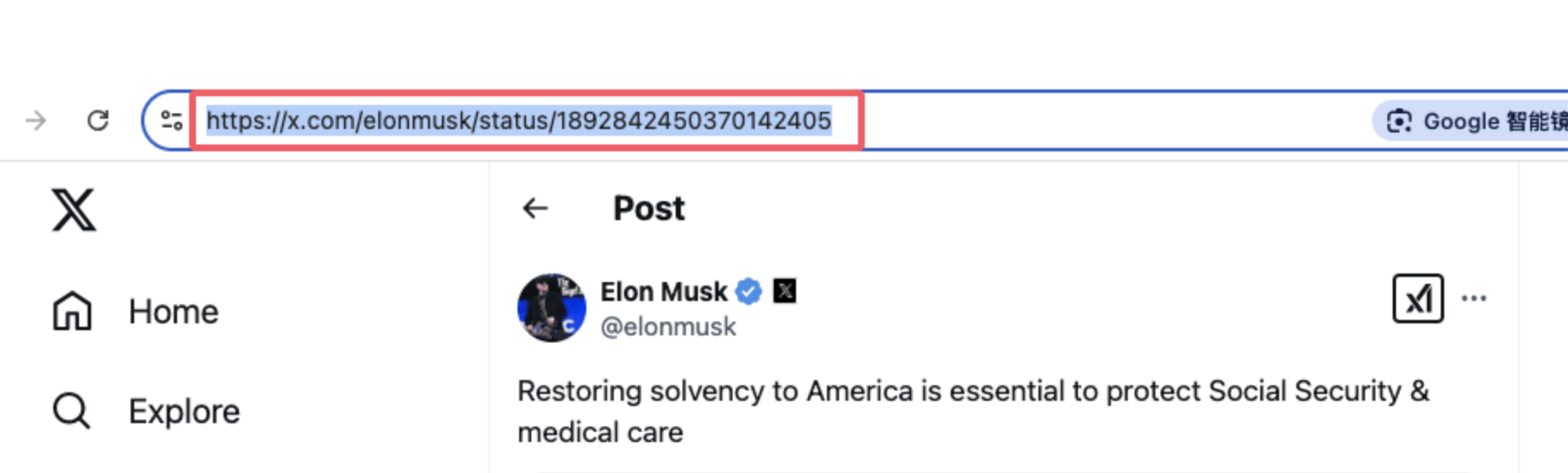
Copy from the address bar 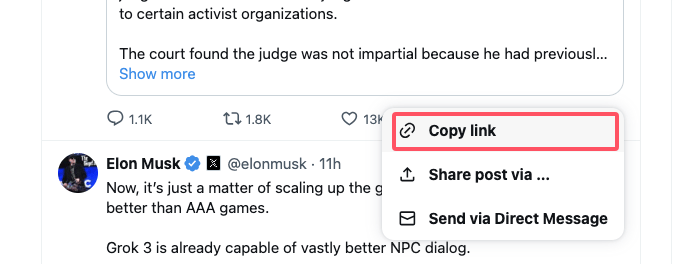
Copy link from Share - 2
Get and save the video
Paste the post link into the downloader and select Get video. Check the preview, choose an available quality, and click Download.
What the result tells you
- •Dimensions and bitrate come from the source video.
- •Each quality is a separate MP4 download.
- •An HLS m3u8 stream appears separately when the source provides one.
Choose the right video quality
Larger dimensions usually make a better choice for a large screen, while a smaller format uses less storage and mobile data. This Twitter video downloader shows the source dimensions and bitrate when available. It does not upscale videos, remove embedded watermarks, or add a new watermark.
Use the play button to preview a clip before downloading. A quoted post's video is identified separately, with a link to its source. Copy direct link is useful when you want the source MP4 URL instead of a local file; that link may stop working later. For animated posts, use the Twitter GIF downloader to filter GIF media separately.
Save Twitter videos on your phone or computer
On a desktop browser, the file usually appears in Downloads or the folder you choose. On iPhone or Android, check your browser's download list or Files app; saving a file does not necessarily add it to Photos or Gallery. Keep this page open while the transfer runs.
How to download Twitter videos on iPhone
Open Safari, paste the public Twitter or X link, and tap Get video. Select an available MP4 quality and tap Download. Safari prompts you to confirm the download; once finished, tap the Downloads icon in the address bar to view the video in your Files app or share it directly to your Photos library.
How to download Twitter videos on Android
Open Chrome or your preferred browser, paste the Twitter or X post URL, and tap Get video. Choose the best available resolution and click Download. The MP4 video file will be saved directly to your device's Downloads folder and will appear in your Gallery or Files app.
The Twitter video downloader works in the browser without an extension. Only save and reuse material you own or have permission to use. The original author's rights remain with them.
Twitter video downloader questions
Is this Twitter video downloader free?
Yes. You can retrieve a public post and download its available MP4 files without a TwiFlux account. Requests are rate limited to keep the tool usable, and each file has a 500 MiB limit. Choose a lower-resolution format if a video is too large.
Is Twitter Video Downloader safe?
Yes. TwiFlux processes public links directly in your browser without requiring account login, passwords, or personal information. Downloads are fetched securely without third-party extensions or malware.
Does the Twitter video downloader work with X links?
Yes. Paste the complete post link from x.com or twitter.com, including mobile.twitter.com links. Copy the link to the specific post rather than an account profile, a search page, or the video player itself.
How do I download a Twitter video on iPhone?
Open Safari, paste the post link into TwiFlux, and tap Get video. Select your preferred MP4 quality and tap Download. When Safari prompts you, tap Download to save the file to your Files app, where you can share or save it to Photos.
How do I download a Twitter video on Android?
Open Chrome or your preferred browser, paste the Twitter or X link, and tap Get video. Choose an available quality and click Download. The MP4 video will be saved directly to your device's Downloads folder.
Does TwiFlux add a watermark?
No. TwiFlux does not add any watermarks, logos, or overlays to downloaded videos. The saved MP4 file contains the exact original media stream provided by Twitter or X.
Where does the downloaded MP4 file go?
On desktop computers, files are saved in your browser's default Downloads folder. On iPhone and iPad, downloads appear in Safari's download manager and the Files app. On Android, files go directly to the Downloads folder or Gallery.
Why is there no HD or 1080p option?
The Twitter video downloader lists only the MP4 formats available from the source. It cannot increase the original resolution. Best available means the highest returned bitrate, not a promise of HD. Portrait videos show their actual dimensions alongside the quality label.
Can I download a private or deleted video?
No. This tool cannot recover deleted content or access protected posts. Open the original post to check its availability. Public posts may also become temporarily inaccessible when X limits requests; wait before trying again.
Can this Twitter video downloader save GIFs?
When a post contains an animated GIF with an available MP4 variant, you can save that MP4 file. The result is a video, not a .gif conversion. When an HLS playlist is available, a separate m3u8 stream link opens it for a compatible browser or player. This tool does not convert HLS streams to MP4.
What if the download stops?
Keep the page open until the file is ready. Cancel and retry if your connection drops, or choose a smaller format. The Twitter video downloader shows received bytes; a percentage appears only when the source supplies a file size. Check your browser downloads after the file is ready.
Explore Twitter tools
Start with a focused tool for media downloads, post exports, or thread reading.